


Inmigreat: USCIS Case Tracker
4.9306.00 Reviews
App Specs
- Version
- 2.3.53
- Updated On
- License
- Free
- Downloads
- 100,000+
- Developer
- Inmigreat LLC
- Categories
- Tools
- Platform
- Android
Screenshots

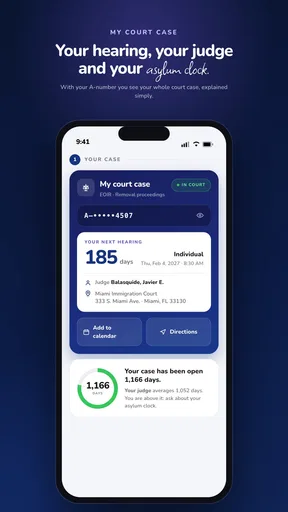
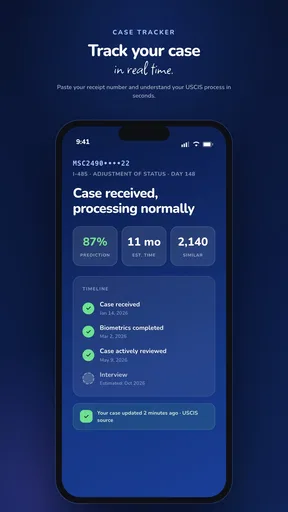
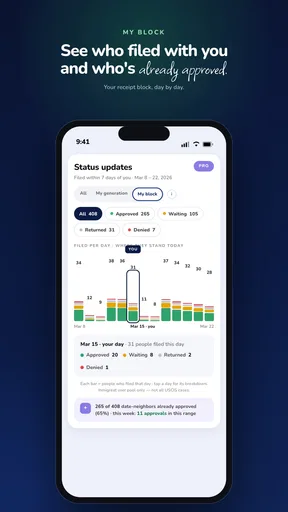
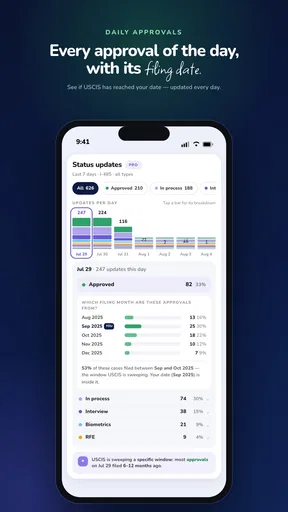

 Analysis by AppCompare
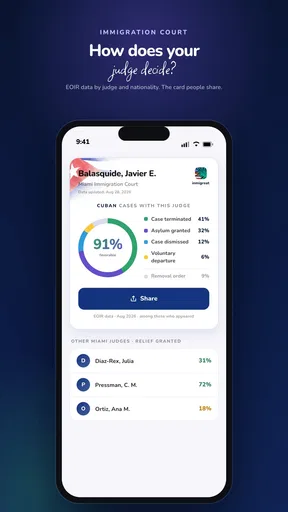
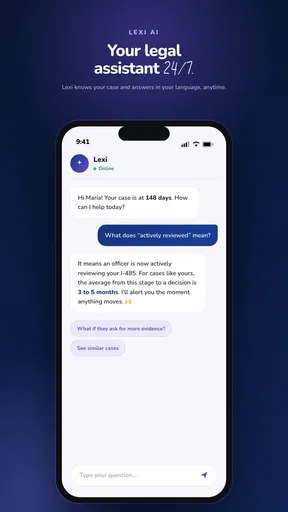
Waiting for an immigration case update can turn an ordinary phone check into a daily habit. Inmigreat: USCIS Case Tracker is built for that exact tension: it brings USCIS and EOIR case monitoring into a tools app, with status alerts, personal statistics, and a way to see your place in line. I found its purpose easy to understand, but its real value depends on whether you need repeated monitoring rather than a one-time status lookup.
Inmigreat is developed by Inmigreat LLC and is available as a free app for everyone. It has reached over 100 thousand installs and holds a 4.9 average from around 4.8 thousand ratings, which suggests that many people find the central tracking experience useful. The app was released on June 14, 2023, and version 2.3.53 is the current version. It runs on Android 7.0 or later, so it remains accessible on many older phones.
What the app actually helps you do
The simplest way to understand Inmigreat is as a companion for people who do not want to keep returning to official case pages manually. Instead of treating a case number as something you check only when you remember, the app is designed around ongoing awareness. Its focus is not general immigration education; it is the practical side of following a USCIS or EOIR case and noticing movement.
That distinction matters. Someone who only wants to enter a receipt number once and read the latest status may not need a dedicated tracker. The stronger use case is a person with an active case who wants a more organized view of progress, alerts when the status changes, and context about how their case compares with broader timing patterns.
The “place in line” idea is especially useful when read carefully. It can give a person a more understandable way to think about waiting than a bare status label. A status such as “case was received” may not tell you how long the next step could take. A position-oriented view can make the waiting period easier to follow, although it should be treated as an estimate or comparison tool rather than a promise of an exact decision date.
Useful for more than one kind of case
Support for both USCIS and EOIR is an important part of the app’s identity. These systems serve different parts of the immigration process, so a tool that brings both into one tracking experience can be more convenient for users whose records do not fit neatly into a single agency workflow.
I would still approach the app as a monitoring layer, not as a replacement for official notices, legal advice, or direct communication with the relevant agency. An alert can tell you that something appears to have changed, but the actual notice, deadline, or instruction deserves careful reading in its original official context.
Worth Reading Before You Choose

EA SPORTS FC Mobile 26 Is a Bigger Football Game, but It Takes Time

Flipboard Shows What News Apps Must Do Beyond the Feed

Switching to Android Auto Means Rethinking Your Driving Routine

Google Calendar Makes a Crowded Week Easier to Manage

Ludo King Makes the Most of the Minutes Between Plans

Baby Panda World Brings Quick Play to Modern Phones, but Its Game Library Feels Busy
A realistic everyday workflow
Imagine someone who has submitted a case and is balancing work, family responsibilities, and appointments. Checking an official portal every morning may be too much, while checking once every few months risks missing an important change. Inmigreat fits between those extremes: the user can set up tracking, rely on status alerts for routine awareness, and open the case information when something deserves attention.
The practical benefit is not that the app removes uncertainty. It gives uncertainty a place to live. Rather than keeping a receipt number in a notes app, searching an email thread, and trying to remember the last status viewed, the user can make case monitoring a more deliberate part of their phone routine.
A second useful workflow involves several cases in one household. A person may be following their own filing while also helping a spouse or relative. A tracker can reduce the mental burden of remembering which case was checked and when. The value grows with the number of cases, but so does the need to label and review information carefully so that one person’s update is not mistaken for another’s.
Free access, paid value, and what to consider before spending
The app is free to install, which makes it easy to test without committing money at the beginning. That is the most important cost fact for a cautious user: you can find out whether the tracking workflow suits you before deciding whether any optional purchase is worthwhile.
In-app purchases range from $3.99 to $349.99 per item. That is a very wide span, so I would not judge the app’s value from the existence of purchases alone. The sensible approach is to use the free experience first, identify which part of the workflow actually helps you, and inspect each purchase screen carefully before confirming anything.
For someone following one case and checking occasionally, free access may be enough. Paying could make more sense for a user who depends heavily on alerts, personal statistics, or additional tracking-related value, but the decision should be based on the exact option shown inside the app rather than on assumptions about what every user receives.
My cost rule is simple: treat free access as the trial, and treat every optional purchase as a separate decision. Do not pay merely because waiting is stressful. Pay only if the specific paid benefit saves you meaningful time or gives you a monitoring function you will genuinely use.
How the value compares with usual alternatives
The usual alternative is to use an official USCIS or EOIR channel directly whenever you want an update. That route remains essential because official sources are the reference point for your case. The drawback is convenience: manual checking can become repetitive, and a person may not get the same consolidated view of alerts, personal statistics, and line-position context in one place.
Another alternative is a spreadsheet, notes app, or calendar reminder. Those tools are flexible, but they make the user responsible for entering every change and remembering every follow-up. Inmigreat’s appeal is that it is designed specifically around immigration case monitoring rather than asking a general-purpose tool to imitate a tracker.
There is also a human alternative: asking a lawyer or accredited representative to monitor the case. Professional help is more appropriate when the case involves complicated legal questions, a notice that is difficult to interpret, or a deadline with serious consequences. An app can reduce routine checking, but it cannot replace professional judgment.
What you gain beyond a basic status page
The combination of alerts, personal statistics, and line-position information gives the app more depth than a simple “current status” display. Alerts address the problem of forgetting to check. Personal statistics can help users understand their own case history and activity. The place-in-line view offers a way to interpret waiting in a broader context.
These features are most valuable when used together. An alert tells you when to look; the case view tells you what changed; the statistics and position information help you place that change—or the lack of it—within a longer waiting period. That is a more useful workflow than repeatedly opening a page without recording what you saw.
One tip I would give new users is to avoid treating the app as a prediction machine. Use its comparative information to organize expectations, not to schedule travel, resign from work, or assume an approval is imminent. Immigration timelines can shift, and a position indicator should support planning rather than dictate it.
Where the experience can create friction
The first limitation is unavoidable: a tracker is only as useful as the information it can display and the user’s ability to interpret it. A notification may create relief or alarm, but the important question is what the underlying update requires. I would open the relevant case details and compare them with any official notice instead of acting on a brief alert alone.
The second limitation is emotional rather than technical. More visibility does not always mean less anxiety. Someone who already checks constantly may find that alerts and statistics encourage even more checking. In that situation, the app works better with a personal routine—for example, reviewing updates at a reasonable time—rather than allowing every notification to interrupt the day.
The third trade-off concerns paid options. Because purchases can extend from a low entry price to a much higher item price, users need to slow down at the purchase screen. The free label makes the app approachable, but it does not mean every useful capability is necessarily free. I would compare the exact benefit, duration, and scope of an option with how many cases you actually monitor.
There is also a privacy and organization consideration that applies to any case-tracking tool: immigration records are sensitive. I would avoid sharing screenshots casually, keep access to the phone controlled, and make sure family members know which case belongs to whom. Those habits are especially important when one device is used to follow several people.
When another option is better
I would skip a dedicated tracker if you have no active USCIS or EOIR case, if you only need a single official lookup, or if you are uncomfortable managing case information through an additional app. Direct official channels are the better choice when you need the authoritative record and do not care about ongoing alerts or comparative context.
I would also choose professional assistance when a case has a complicated history, when a notice contains legal language you do not understand, or when the next action could affect your rights. Inmigreat can help you notice that something happened; it cannot tell you the complete legal meaning of that event.
For users with several cases, the app may be more attractive than a general notes system because the whole purpose is immigration monitoring. Even then, I would keep important receipt numbers, notices, and deadlines backed up in a separate secure place. A tracker should be part of your organization system, not the only copy of information that matters.
Who is most likely to get real value
Inmigreat is a strong fit for people who are tired of manually checking case pages, want alerts instead of relying on memory, or need a clearer way to follow waiting progress. It is also potentially useful for relatives who help monitor more than one case and want a dedicated place for that responsibility.
The app is less compelling for a person who expects a guaranteed timeline. Its statistics and position information can make waiting more understandable, but they should not be read as official promises. The best users are comfortable using data as context while continuing to rely on official notices for decisions.
It is also a reasonable starting point for someone who wants to test a tracking routine without paying at installation. Since the app is free and rated for everyone, the barrier to trying it is low. The important qualification is to remain attentive to optional purchases and to decide whether the added convenience is worth the exact price presented.
One advanced habit is to use the app for awareness while keeping a separate action list. When a status changes, write down the date you noticed it, the official instruction connected with it, and any deadline that applies. This prevents a notification from becoming a vague memory and turns it into a concrete next step.
My final recommendation
I see Inmigreat as a practical monitoring tool rather than a substitute for official case records or immigration professionals. Its best contribution is the combination of alerts, case organization, personal statistics, and a line-position perspective. Those features address the everyday frustration of waiting more effectively than a basic page that you must remember to open yourself.
The free entry point makes it worth trying for anyone with an active USCIS or EOIR case who wants a more regular tracking routine. I would spend time with the free experience first, then judge any purchase by one question: does this specific option provide enough ongoing value for the way I monitor my case?
My recommendation is positive for people who need repeated updates and can keep expectations realistic. I would skip it for one-off lookups, complicated legal interpretation, or anyone who wants certainty rather than monitoring. Used with official sources and sensible privacy habits, Inmigreat can make the waiting process more organized without pretending to control the outcome.
Pros
- Tracks USCIS case updates in one convenient dashboard.
- Supports multiple cases for monitoring family or group applications.
- Provides timely notifications when case statuses change.
- Offers a simpler overview than repeatedly checking the USCIS website.
- Useful for applicants managing several immigration filings at once.
Cons
- It is not an official USCIS app and cannot influence case decisions.
- Updates may appear later than official USCIS notifications.
- Some features may require payment or include advertisements.
- Case information depends on accurate USCIS data and may be incomplete.
- Users should avoid entering sensitive details unless they trust the app’s privacy practices.
FAQs for Inmigreat: USCIS Case Tracker
What is Inmigreat: USCIS Case Tracker used for?
Inmigreat: USCIS Case Tracker is designed to help users monitor the progress of immigration cases handled by USCIS. After entering the relevant receipt number, users can review available case updates, status changes, and notifications in one place. It is mainly a tracking and organization tool, not an official immigration filing service or a replacement for legal advice.
Is Inmigreat: USCIS Case Tracker an official USCIS application?
No. Inmigreat: USCIS Case Tracker is a third-party application and should not be confused with the official USCIS website or government services. The app may display information obtained from USCIS case-status systems, but USCIS controls the underlying records and processing decisions. For authoritative updates, notices, filing instructions, and account information, users should always verify details through official USCIS channels.
What information do I need to track a USCIS case?
Typically, you need the USCIS receipt number associated with your application or petition. This number is usually printed on the Form I-797 receipt notice and contains three letters followed by numbers. Enter it carefully, without unnecessary spaces or symbols. If you have several cases, the app may let you save and organize multiple receipt numbers for easier monitoring.
Can Inmigreat predict my approval date or speed up my case?
No. A tracking application cannot accelerate USCIS processing, influence an officer’s decision, or guarantee an approval date. Any estimated timelines, alerts, or predictions should be treated as informational rather than official commitments. Processing times can change because of workload, case type, service center, background checks, requests for evidence, and other factors. Always rely on USCIS notices for formal decisions.
Is my personal information safe when using the app?
Before adding receipt numbers or other case-related details, review Inmigreat’s current privacy policy, permissions, and data-handling practices in the app store listing. Avoid entering passwords, Social Security numbers, A- numbers, payment details, or sensitive documents unless the app clearly explains why they are needed. Keep the application updated, use a secure device, and confirm important information through official USCIS sources.


